# Android app 1.13.2 crashes with no error
**URL:** https://community.passbolt.com/t/android-app-1-13-2-crashes-with-no-error/7479
**Category:** Installation Issues
**Created:** [May 22, 2023, 4:10pm UTC](https://community.passbolt.com/t/android-app-1-13-2-crashes-with-no-error/7479 "2023-05-22T16:10:23Z")
**Posts on this page:** 20
**Page:** 1
### Author:  [@zipelkopf](https://community.passbolt.com/u/zipelkopf)
#### Post date: [May 22, 2023, 4:10pm UTC](https://community.passbolt.com/t/android-app-1-13-2-crashes-with-no-error/7479/1 "2023-05-22T16:10:23Z")
Hi, I have updated my self-hosted Passbolt, CentOS 7 and script based, to the latest Master version.
I have also updated the Android App to the latest 1.13.2 version.
After having succesfully trasnfered the access with the QR code to the mobile, as soon as I login with my password the app crashes without returning any error, it simply closes down.
Steps to reproduce:
1. Transfer the account credentials with the QR code
2. Open the App and type my Password
3. Deny the usage of fingerprints
4. Deny the usage of auto-fill
5. The app seems opening when suddently closes down, crashing with no errors to the user. Impossibile to do anything before that.
Any advice?
Thank you
---
### Author:  [@garrett](https://community.passbolt.com/u/garrett)
#### Post date: [May 22, 2023, 5:51pm UTC](https://community.passbolt.com/t/android-app-1-13-2-crashes-with-no-error/7479/2 "2023-05-22T17:51:18Z")
Hi @zipelkopf Welcome to the forum!
Can you confirm the model of your Android device and/or which Android version it’s running?
Also try to find passbolt logs on the server side indicating what is happening. If you can’t find them, how did you install your passbolt? Via package or source?
---
### Author:  [@zipelkopf](https://community.passbolt.com/u/zipelkopf)
#### Post date: [May 22, 2023, 8:21pm UTC](https://community.passbolt.com/t/android-app-1-13-2-crashes-with-no-error/7479/3 "2023-05-22T20:21:24Z")
Hi @garrett and thanks for your quick engagement.
The mobile I’m using is a Samsung Galaxy S21, running Android 13.
I succesfully updated Passbolt using the script and following the official tutorial at [Passbolt Help | Update passbolt on Centos 7 (installation script)](https://help.passbolt.com/hosting/update/install-scripts.html)
Everything else works perfectly fine, only the Android app presents this issue.
I repeated the process and looked into the logs but the folder is empty
```auto
[root@missioncontrol logs]# ll
total 0
```
I manage to trap the error in Android for reporting puproses, see details below:
- Exception class name: `java.time.format.DateTieParseException`
- Source file: `DateTimeFormatter.java`
- Source class: `java.time.format.DateTimeFormatter`
- Source method: `parseResolved0`
- Line number: `2044`
Stack trace attached as image:
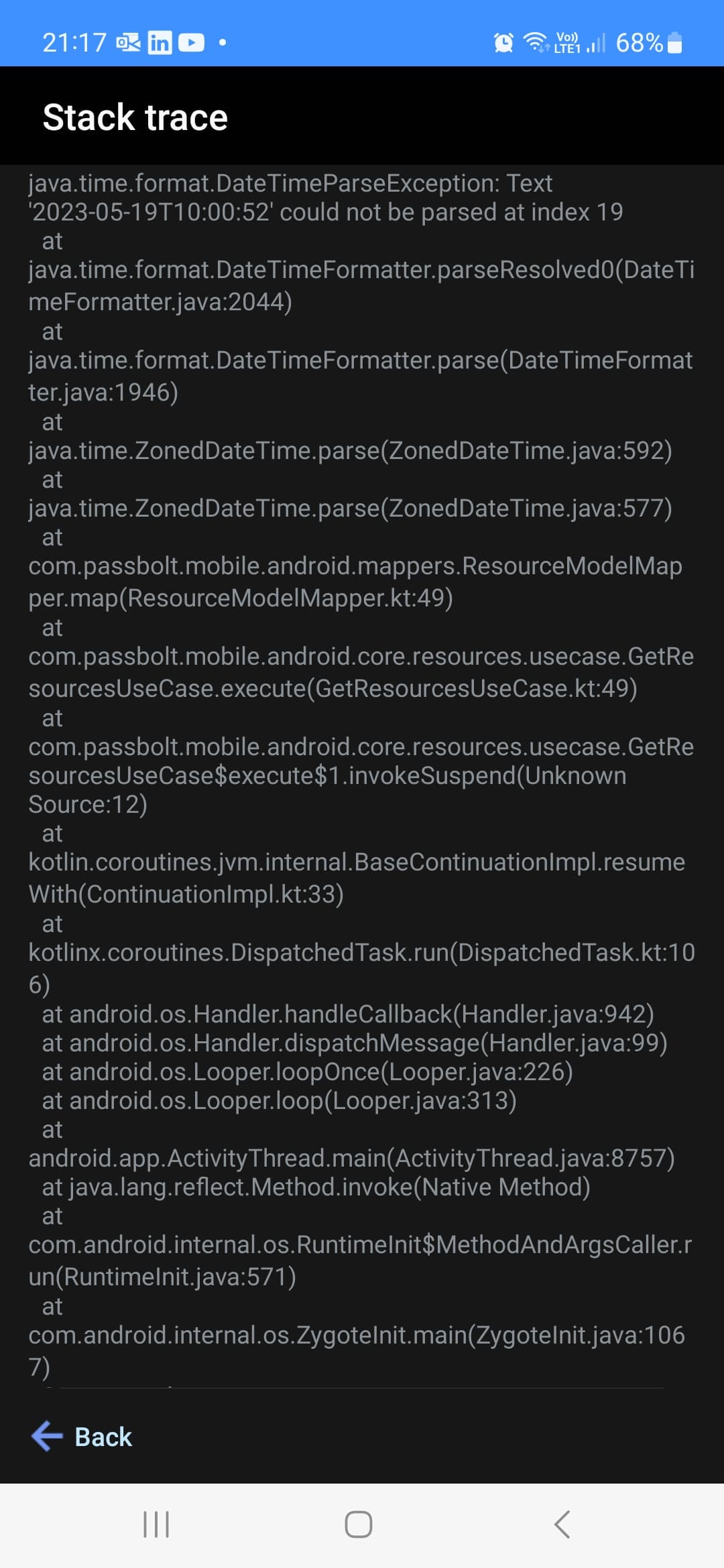
Thanks and kind regards
---
### Author:  [@garrett](https://community.passbolt.com/u/garrett)
#### Post date: [May 22, 2023, 8:29pm UTC](https://community.passbolt.com/t/android-app-1-13-2-crashes-with-no-error/7479/4 "2023-05-22T20:29:58Z")
My first thought is to check the device time compared to the server time. They need to both be accurate. Servers are more likely to be off, typically.
---
### Author:  [@zipelkopf](https://community.passbolt.com/u/zipelkopf)
#### Post date: [May 23, 2023, 8:57pm UTC](https://community.passbolt.com/t/android-app-1-13-2-crashes-with-no-error/7479/5 "2023-05-23T20:57:00Z")
Thanks, I checked the server time Vs mobile phone and they are both spot on!
Also, I guess if the server time wasn’t right then I would not be able to login from other desktop/laptops.
The issue points to a parsing error in Java… it seems more an unhandled exception to me… isnt’t it?
How can I contact the Passbolt Android developers to forward the stack trace?
Best regards
---
### Author:  [@garrett](https://community.passbolt.com/u/garrett)
#### Post date: [May 24, 2023, 3:31am UTC](https://community.passbolt.com/t/android-app-1-13-2-crashes-with-no-error/7479/6 "2023-05-24T03:31:23Z")
@zipelkopf You could report it on [github](https://github.com/passbolt/mobile-passbolt-android) for bugs or they might respond here.
---
### Author:  [@mmichalek](https://community.passbolt.com/u/mmichalek)
#### Post date: [May 24, 2023, 7:13am UTC](https://community.passbolt.com/t/android-app-1-13-2-crashes-with-no-error/7479/7 "2023-05-24T07:13:41Z")
Hello @zipelkopf , we have the exact same issue reported on GitHub: [App Crashes After Login (DateTimeParseException) · Issue #4 · passbolt/mobile-passbolt-android · GitHub](https://github.com/passbolt/mobile-passbolt-android/issues/4) concerning installation from source; Basically, for some reason, there is no time zone information in the dates received from the backend and mobile uses ZonedDateTime for parsing, so it treats the date as invalid. We’ll see how to proceed with that and let you know.
---
### Author:  [@zipelkopf](https://community.passbolt.com/u/zipelkopf)
#### Post date: [May 24, 2023, 8:18am UTC](https://community.passbolt.com/t/android-app-1-13-2-crashes-with-no-error/7479/8 "2023-05-24T08:18:01Z")
@garrett / @mmichalek thanks a mill!
I have subscribed the GitHub issue so to follow up on progress.
Cheers
---
### Author:  [@pabloelcolombiano](https://community.passbolt.com/u/pabloelcolombiano)
#### Post date: [June 1, 2023, 9:03am UTC](https://community.passbolt.com/t/android-app-1-13-2-crashes-with-no-error/7479/9 "2023-06-01T09:03:04Z")
Hello @zipelkopf ,
as a back-end developer, I am trying to reproduce your issue, with no success. You say you use CentOS7.
1. Which PHP version do you use?
`php -v`
2. What is the output of the following command:
`/usr/share/php/passbolt/bin/cake passbolt version`
3. Which database engine do you use, and which version?
4. If you call the url on your browser
`/resources.json?contain[permission]=1&contain[favorite]=1&contain[tag]=1&contain[permissions.group]=1&limit=1`
without pasting the complete output here, can you indicate the format in which the dates `created` and `modified` are returned?
Thanks a lot!
---
### Author:  [@zipelkopf](https://community.passbolt.com/u/zipelkopf)
#### Post date: [June 2, 2023, 11:37am UTC](https://community.passbolt.com/t/android-app-1-13-2-crashes-with-no-error/7479/10 "2023-06-02T11:37:08Z")
Hi @pabloelcolombiano,
please find more details below:
**PHP Version**
```auto
[root@missioncontrol ~]# php -v
PHP 7.4.33 (cli) (built: Nov 8 2022 15:16:44) ( NTS )
Copyright (c) The PHP Group
Zend Engine v3.4.0, Copyright (c) Zend Technologies
with Zend OPcache v7.4.33, Copyright (c), by Zend Technologies
```
**Passbolt Version**
```auto
[root@missioncontrol ~]# /home/missioncontrol/public_html/passbolt/bin/cake passbolt version
______ ____
/ __\____ _________ / /_ ____ / / /_
/ /_/ / __`/___ / ___/__ \/ __\/ /__ /
/ ____/ /_/ (__ |__ ) /_/ / /_/ / / /
/_/ \ __,_/____ / ____/_.___ /\ ____/_/\__ /
Open source password manager for teams
-------------------------------------------------------------------------------
Passbolt CE 4.0.0
Cakephp 4.2.9
```
**Datetime format from `resources.json`**
```auto
"created": "2023-02-20T16:07:41",
"modified": "2023-05-19T10:00:52",
```
Thank you and let me know if I can be of any help in testing a pre-release APK of the Android App.
---
### Author:  [@pabloelcolombiano](https://community.passbolt.com/u/pabloelcolombiano)
#### Post date: [June 8, 2023, 2:32pm UTC](https://community.passbolt.com/t/android-app-1-13-2-crashes-with-no-error/7479/11 "2023-06-08T14:32:06Z")
Hi @zipelkopf ,
I am surprized to see the combination Passbolt on 4.0 and CakePHP on 4.2.9.
Passbolt 4.0 on premise runs with CakePHP 4.4.14.
Could you by update your vendors, by running:
`composer install`
Do you have composer installed? Since you have installed passbolt from the Github repository, you must have used it previously.
You will find more documentation on composer here: [https://getcomposer.org/](https://getcomposer.org/)
---
### Author:  [@max](https://community.passbolt.com/u/max)
#### Post date: [June 19, 2023, 7:22am UTC](https://community.passbolt.com/t/android-app-1-13-2-crashes-with-no-error/7479/12 "2023-06-19T07:22:57Z")
Hey @zipelkopf,
Just a gentle reminder if you can provide more information
Cheers,
Max
---
### Author:  [@zipelkopf](https://community.passbolt.com/u/zipelkopf)
#### Post date: [June 25, 2023, 3:27pm UTC](https://community.passbolt.com/t/android-app-1-13-2-crashes-with-no-error/7479/13 "2023-06-25T15:27:54Z")
@pabloelcolombiano @max
Hi, please find the composer version:
```auto
[root@missioncontrol ~]$ composer -V
Composer version 2.5.5 2023-03-21 11:50:05
```
I have followed the instruction for updating Passbolt (including Composer and dependencies) that I found in the official documentation, where Composer v2 is specified: [Passbolt Help | Update passbolt on Centos 7 (installation script)](https://help.passbolt.com/hosting/update/install-scripts.html#update-the-dependencies).
Please note everything works perfectly in Passbolt itself.
Based on the Android stack trace that I provided earlier, would it be feasible to handle in Android the different date/time format that may be returned? Perhaps jsut adding the missing `index[19]` to the date/time parameter before being parsed?
Thanks
---
### Author:  [@zipelkopf](https://community.passbolt.com/u/zipelkopf)
#### Post date: [August 6, 2023, 9:06pm UTC](https://community.passbolt.com/t/android-app-1-13-2-crashes-with-no-error/7479/14 "2023-08-06T21:06:25Z")
Hi, just checking if there’s been any progress here…
Happy to help with any testing 🙂
Cheers
---
### Author:  [@pabloelcolombiano](https://community.passbolt.com/u/pabloelcolombiano)
#### Post date: [August 28, 2023, 12:28pm UTC](https://community.passbolt.com/t/android-app-1-13-2-crashes-with-no-error/7479/15 "2023-08-28T12:28:53Z")
Hi @zipelkopf ,
for your information, a fix was added to the API in version 4.1. Could you update your passbolt version and tell us if this solved your issue?
Thank you in advance!
---
### Author:  [@zipelkopf](https://community.passbolt.com/u/zipelkopf)
#### Post date: [August 28, 2023, 5:25pm UTC](https://community.passbolt.com/t/android-app-1-13-2-crashes-with-no-error/7479/16 "2023-08-28T17:25:39Z")
Thanks a lot @pabloelcolombiano !
I will do my best to backup all , upgrade by this week and keep you posted.
Perhaps, would you have the link to the commit in GitHub? Just to grab the essence of the change…
Cheers
---
### Author:  [@pabloelcolombiano](https://community.passbolt.com/u/pabloelcolombiano)
#### Post date: [August 29, 2023, 8:47am UTC](https://community.passbolt.com/t/android-app-1-13-2-crashes-with-no-error/7479/17 "2023-08-29T08:47:01Z")
Sure, [here is the commit](https://github.com/passbolt/passbolt_api/commit/c823afc6af14e3e53741963f674a5cd10cfddadc).
---
### Author:  [@zipelkopf](https://community.passbolt.com/u/zipelkopf)
#### Post date: [August 31, 2023, 4:16pm UTC](https://community.passbolt.com/t/android-app-1-13-2-crashes-with-no-error/7479/18 "2023-08-31T16:16:27Z")
Hi @pabloelcolombiano,
I updated my my side, but I also noticed that the Android app got updated too:
1. I can complete the “transfer” process using the QR code
2. I can login on the Android app using my credentials
3. The App closes down by itself, without providing any error message or crash report, as soon as the main page (password list) starts to open.
It seems that the time exception has been hadnled anyway now 🙂 …but there might be another issue somewhere else.
I will have to install a brandnew instance on Ubuntu over the next weeks, so I can check the issue again on a clean code.
Cheers & thanks!
---
### Author:  [@mmichalek](https://community.passbolt.com/u/mmichalek)
#### Post date: [September 6, 2023, 6:24am UTC](https://community.passbolt.com/t/android-app-1-13-2-crashes-with-no-error/7479/19 "2023-09-06T06:24:17Z")
hello @zipelkopf, if after a clean install you still have some issues on Android please let us know and please provide logs.
---
### Author:  [@zipelkopf](https://community.passbolt.com/u/zipelkopf)
#### Post date: [September 6, 2023, 11:01am UTC](https://community.passbolt.com/t/android-app-1-13-2-crashes-with-no-error/7479/20 "2023-09-06T11:01:01Z")
Hi @mmichalek / @pabloelcolombiano
I have some good and bad news… let’s start witht he good one 🙂
I confirm that this issue is resolved when performing a clean install with version 4.2.0
Please note I installed from Source, in Ubuntu 22.04.
THANKS A LOT!
Unfortunatelly there’s another issue (not related to this one) in relation to the database migration from 4.0.0 to 4.2.0 …to put it simple, once migrated the existing accounts are no longer recognised ☹ so I had to start with a clean database and import all passwords from a backup… but that’s another story 😉
I just wish to thanks everybody involved with upkeeping the project!