# Could not verify server key. The OpenPGP server key defined in the config could not be found in the GnuPG keyring
**URL:** https://community.passbolt.com/t/could-not-verify-server-key-the-openpgp-server-key-defined-in-the-config-could-not-be-found-in-the-gnupg-keyring/855
**Category:** Installation Issues
**Created:** [July 18, 2018, 1:24pm UTC](https://community.passbolt.com/t/could-not-verify-server-key-the-openpgp-server-key-defined-in-the-config-could-not-be-found-in-the-gnupg-keyring/855 "2018-07-18T13:24:36Z")
**Posts on this page:** 20
**Page:** 1
### Author:  [@mzanetti](https://community.passbolt.com/u/mzanetti)
#### Post date: [July 18, 2018, 1:24pm UTC](https://community.passbolt.com/t/could-not-verify-server-key-the-openpgp-server-key-defined-in-the-config-could-not-be-found-in-the-gnupg-keyring/855/1 "2018-07-18T13:24:36Z")
Hello Everybody,
I finally made it to install and successfully configure Passbolt.
After the first configuration the wizard took me to the main login page but I got this message
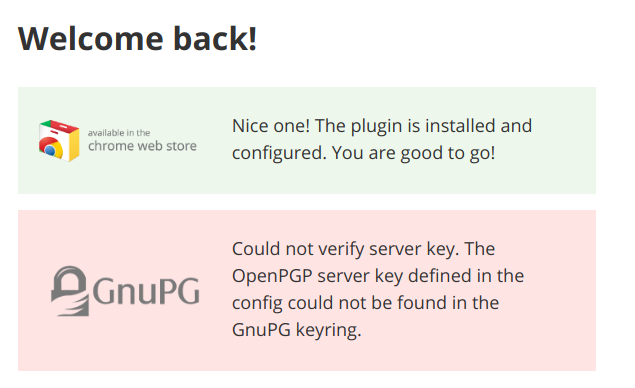
I probably made some mistake in the GPG key configuration.
What surprises me is that the healtcheck is good. Grepping it with the “key” keyword I get the following:
```
[PASS] The server gpg key is not the default one
[PASS] The directory /home/mzanetti/.gnupg containing the keyring is writable by the webserver user.
[PASS] The public key file is defined in config/passbolt.php and readable.
[PASS] The private key file is defined in config/passbolt.php and readable.
[PASS] The server key fingerprint matches the one defined in config/passbolt.php.
[PASS] The server public key defined in the config/passbolt.php is in the keyring.
[PASS] There is a valid email id defined for the server key.
[PASS] The public key can be used to encrypt a message.
[PASS] The private key can be used to sign a message.
[PASS] The public and private keys can be used to encrypt and sign a message.
[PASS] The private key can be used to decrypt a message.
[PASS] The private key can be used to decrypt and verify a message.
[PASS] The public key can be used to verify a signature.
```
So I can’t see where the issue could be. Could it be because the server is trying to access the keyring of my user but apache runs with the www-data user? I’m not really into this whole GPG keys thing so I could easily have perfomed some mistake… -.-
Thank you to anyone who will help
Marco
---
### Author:  [@cedric](https://community.passbolt.com/u/cedric)
#### Post date: [July 18, 2018, 1:28pm UTC](https://community.passbolt.com/t/could-not-verify-server-key-the-openpgp-server-key-defined-in-the-config-could-not-be-found-in-the-gnupg-keyring/855/2 "2018-07-18T13:28:51Z")
I can see you are running the healtcheck with your personal user.
Can you run the healtcheck with the user who runs your webserver ? It should help you to complete your installation.
---
### Author:  [@mzanetti](https://community.passbolt.com/u/mzanetti)
#### Post date: [July 18, 2018, 1:37pm UTC](https://community.passbolt.com/t/could-not-verify-server-key-the-openpgp-server-key-defined-in-the-config-could-not-be-found-in-the-gnupg-keyring/855/3 "2018-07-18T13:37:04Z")
Thank you Cedric,
that was a clever move and it worked.
In order to help future users I’ll report here the command I used
`sudo -u www-data ./bin/cake passbolt healthcheck`
since www-data doesn’t have a password
I got one error
> [FAIL] The server public key defined in the config/passbolt.php is not in the keyring
> [HELP] Import the private server key in the keyring of the webserver user.
> [HELP] you can try:
> [HELP] sudo su -s /bin/bash -c “gpg --home /var/www/.gnupg --import /var/www/passbolt\_api/config/gpg/serverkey\_private.asc” www-data
So I did perform the command and got the following result
```
data
gpg: key 08750EFE: secret key imported
gpg: key 08750EFE: public key "Marco Zanetti" imported
gpg: Total number processed: 1
gpg: imported: 1 (RSA: 1)
gpg: secret keys read: 1
gpg: secret keys imported: 1
```
which sounds good. But still, if I perform another healtcheck, I get the exact same error
> [FAIL] The server public key defined in the config/passbolt.php is not in the keyring
> [HELP] Import the private server key in the keyring of the webserver user.
> [HELP] you can try:
> [HELP] sudo su -s /bin/bash -c “gpg --home /var/www/.gnupg --import /var/www/passbolt\_api/config/gpg/serverkey\_private.asc” www-data
and I get the suggestion to perform the same command again, so I gues it didn’t work properly.
If I try and access the system this is what I get

which is not surprising.
What should I do now?
Thank you
Marco
---
### Author:  [@cedric](https://community.passbolt.com/u/cedric)
#### Post date: [July 18, 2018, 1:42pm UTC](https://community.passbolt.com/t/could-not-verify-server-key-the-openpgp-server-key-defined-in-the-config-could-not-be-found-in-the-gnupg-keyring/855/4 "2018-07-18T13:42:39Z")
Can you check the content of `logs/error.log`.
Did you create/update the config/passbolt.php file with the fingerprint of your key ?
See section 11. [https://help.passbolt.com/hosting/install/ce/debian-9-stretch.html](https://help.passbolt.com/hosting/install/ce/debian-9-stretch.html)
---
### Author:  [@mzanetti](https://community.passbolt.com/u/mzanetti)
#### Post date: [July 18, 2018, 2:07pm UTC](https://community.passbolt.com/t/could-not-verify-server-key-the-openpgp-server-key-defined-in-the-config-could-not-be-found-in-the-gnupg-keyring/855/5 "2018-07-18T14:07:47Z")
The only thing I see in error.log is
> 2018-07-18 14:04:53 Error: [Imagine\Exception\RuntimeException] Gd not installed
> Request URL: /auth/verify.json?api-version=v1
I performed the steps reported in the guide, or at least I think I did.
I noticed that the fingerprint reported in the example is without spaces
` 'fingerprint' => '1C765F5273EC9AF56300BC6F6C76DA6B9F23C8BB',`
while mine is something like
` 'fingerprint' => '1C76 5F52 73EC 9AF5 6300 BC6F 6C76 DA6B 9F23 C8BB',`
How should I paste the fingerprint in the file?
Anyways, I tried both with and without spaces and I get the same “Could not verify server key. An Internal Error Has Occurred” error… -.-
---
### Author:  [@mzanetti](https://community.passbolt.com/u/mzanetti)
#### Post date: [July 18, 2018, 2:14pm UTC](https://community.passbolt.com/t/could-not-verify-server-key-the-openpgp-server-key-defined-in-the-config-could-not-be-found-in-the-gnupg-keyring/855/6 "2018-07-18T14:14:55Z")
> [@mzanetti](#):
>
> Gd not installed
I installed GD and enabled debug mode and now I see this error

Please notice this happens with both the spaces-separated-fingerprint and the without-spaces one.
---
### Author:  [@cedric](https://community.passbolt.com/u/cedric)
#### Post date: [July 18, 2018, 2:19pm UTC](https://community.passbolt.com/t/could-not-verify-server-key-the-openpgp-server-key-defined-in-the-config-could-not-be-found-in-the-gnupg-keyring/855/7 "2018-07-18T14:19:51Z")
> [@mzanetti](#):
>
> ‘fingerprint’ =\> ‘1C765F5273EC9AF56300BC6F6C76DA6B9F23C8BB’,
The fingerprint should be without space.
---
### Author:  [@cedric](https://community.passbolt.com/u/cedric)
#### Post date: [July 18, 2018, 2:20pm UTC](https://community.passbolt.com/t/could-not-verify-server-key-the-openpgp-server-key-defined-in-the-config-could-not-be-found-in-the-gnupg-keyring/855/8 "2018-07-18T14:20:33Z")
Did run again the heathcheck ?
---
### Author:  [@mzanetti](https://community.passbolt.com/u/mzanetti)
#### Post date: [July 18, 2018, 2:21pm UTC](https://community.passbolt.com/t/could-not-verify-server-key-the-openpgp-server-key-defined-in-the-config-could-not-be-found-in-the-gnupg-keyring/855/9 "2018-07-18T14:21:40Z")
Yes, I get two errors
```
[FAIL] Debug mode is on.
[HELP] Set debug = false; in config/passbolt.php
```
and
```
[FAIL] The server public key defined in the config/passbolt.php is not in the keyring
[HELP] Import the private server key in the keyring of the webserver user.
[HELP] you can try:
[HELP] sudo su -s /bin/bash -c "gpg --home /var/www/.gnupg --import /var/www/passbolt_api/config/gpg/serverkey_private.asc" www-data
```
---
### Author:  [@cedric](https://community.passbolt.com/u/cedric)
#### Post date: [July 18, 2018, 2:28pm UTC](https://community.passbolt.com/t/could-not-verify-server-key-the-openpgp-server-key-defined-in-the-config-could-not-be-found-in-the-gnupg-keyring/855/10 "2018-07-18T14:28:04Z")
The private key is not in the keyring, it explains your issue.
Does your www-data user allowed to read the file /var/www/passbolt\_api/config/gpg/serverkey\_private.asc ?
What’s the result of the command given as tips ?
Can you copy/paste here the content of your passbolt.php ?
---
### Author:  [@cedric](https://community.passbolt.com/u/cedric)
#### Post date: [July 18, 2018, 2:37pm UTC](https://community.passbolt.com/t/could-not-verify-server-key-the-openpgp-server-key-defined-in-the-config-could-not-be-found-in-the-gnupg-keyring/855/11 "2018-07-18T14:37:22Z")
Did you change your server key (/var/www/passbolt\_api/config/gpg/serverkey\_private.asc) after completing the plugin setup ?
---
### Author:  [@mzanetti](https://community.passbolt.com/u/mzanetti)
#### Post date: [July 18, 2018, 2:45pm UTC](https://community.passbolt.com/t/could-not-verify-server-key-the-openpgp-server-key-defined-in-the-config-could-not-be-found-in-the-gnupg-keyring/855/12 "2018-07-18T14:45:17Z")
> [@cedric](#):
>
> Does your www-data user allowed to read the file /var/www/passbolt\_api/config/gpg/serverkey\_private.asc ?
Yes, it has permissions. This is the ls of the folder
```
drwxrwxr-x 2 www-data www-data 4096 Jul 17 14:29 .
drwxrwxr-x 6 www-data www-data 4096 Jul 18 14:20 ..
-rw-r----- 1 www-data www-data 1743 Jul 18 14:04 serverkey.asc
-rw-r----- 1 www-data www-data 3634 Jul 18 14:03 serverkey_private.asc
-rw-rw-r-- 1 www-data www-data 3147 Jul 17 14:15 unsecure.key
-rw-rw-r-- 1 www-data www-data 6647 Jul 17 14:15 unsecure_private.key
```
> [@](#):
>
> What’s the result of the command given as tips ?
```
sudo su -s /bin/bash -c "gpg --home /var/www/.gnupg --import /var/www/passbolt_api/config/gpg/serverkey_private.asc" www-data
gpg: key 08750EFE: already in secret keyring
gpg: Total number processed: 1
gpg: secret keys read: 1
gpg: secret keys unchanged: 1
```
> [@](#):
>
> Can you copy/paste here the content of your passbolt.php ?
Sure! Here it comes
```
[
// A base URL to use for absolute links.
// The url where the passbolt instance will be reachable to your end users.
// This information is need to render images in emails for example
'fullBaseUrl' => 'https://passbolt.metide.com',
],
// Database configuration.
'Datasources' => [
'default' => [
'host' => 'localhost',
//'port' => 'non_standard_port_number',
'username' => 'passbolt',
'password' => 'my_db_password',
'database' => 'passbolt',
],
],
// Email configuration.
'EmailTransport' => [
'default' => [
'host' => 'smtp.gmail.com',
'port' => 587,
'username' => 'ouremail@gmail.com',
'password' => 'account_password',
// Is this a secure connection? true if yes, null if no.
'tls' => true,
//'timeout' => 30,
//'client' => null,
//'url' => null,
],
],
'Email' => [
'default' => [
// Defines the default name and email of the sender of the emails.
'from' => ['passbolt@your_organization.com' => 'Passbolt'],
//'charset' => 'utf-8',
//'headerCharset' => 'utf-8',
],
],
/**
* DEFAULT PASSBOLT CONFIGURATION
*
* This is the default configuration.
* It enforces the use of ssl, and does not provide a default OpenPGP key.
* If your objective is to try passbolt quickly for evaluation purpose, and security is not important
* you can use the demo config example provided in the next section below.
*/
'debug' => true,
'passbolt' => [
// GPG Configuration.
// The keyring must to be owned and accessible by the webserver user.
// Example: www-data user on Debian
//'ssl' => [
// 'force' => false,
//],
'gpg' => [
// Tell GPG where to find the keyring.
// If putenv is set to false, gnupg will use the default path ~/.gnupg.
// For example :
// - Apache on Centos it would be in '/usr/share/httpd/.gnupg'
// - Apache on Debian it would be in '/var/www/.gnupg'
// - Nginx on Centos it would be in '/var/lib/nginx/.gnupg'
// - etc.
//'keyring' => getenv("HOME") . DS . '.gnupg',
//
// Replace GNUPGHOME with above value even if it is set.
//'putenv' => false,
// Main server key.
'serverKey' => [
// Server private key fingerprint.
'fingerprint' => '879D50946E5118B3E675682F6F7F2E3308750EFE',
//'public' => CONFIG . 'gpg' . DS . 'serverkey.asc',
//'private' => CONFIG . 'gpg' . DS . 'serverkey_private.asc',
],
],
],
/**
* DEMO CONFIGURATION EXAMPLE
*
* Uncomment the lines below if you want to try passbolt quickly.
* and if you are not concerned about the security of your installation.
* (Don't forget to comment the default config above).
*/
// 'debug' => true,
// 'passbolt' => [
// 'registration' => [
// 'public' => true
// ],
// 'ssl' => [
// 'force' => false,
// ],
// 'gpg' => [
// 'serverKey' => [
// 'fingerprint' => '2FC8945833C51946E937F9FED47B0811573EE67E',
// 'public' => CONFIG . DS . 'gpg' . DS . 'unsecure.key',
// 'private' => CONFIG . DS . 'gpg' . DS . 'unsecure_private.key',
// ],
// ],
// ]
];
```
---
### Author:  [@mzanetti](https://community.passbolt.com/u/mzanetti)
#### Post date: [July 18, 2018, 2:47pm UTC](https://community.passbolt.com/t/could-not-verify-server-key-the-openpgp-server-key-defined-in-the-config-could-not-be-found-in-the-gnupg-keyring/855/13 "2018-07-18T14:47:03Z")
> [@cedric](#):
>
> Did you change your server key (/var/www/passbolt\_api/config/gpg/serverkey\_private.asc) after completing the plugin setup ?
I don’t think I did, because I don’t think I generated new keys after the installation was over. Surely I didn’t do that on purpose, if I did, but can’t be sure… Should I do something in order to check?
---
### Author:  [@mzanetti](https://community.passbolt.com/u/mzanetti)
#### Post date: [July 18, 2018, 3:29pm UTC](https://community.passbolt.com/t/could-not-verify-server-key-the-openpgp-server-key-defined-in-the-config-could-not-be-found-in-the-gnupg-keyring/855/14 "2018-07-18T15:29:01Z")
Here it says something about deleting a user and creating a new one… but I’m not sure how to do it.
> [@The private key cannot be used to do anything here](https://community.passbolt.com/t/the-private-key-cannot-be-used-to-do-anything-here/776/6):
>
> You need to perform a user account recover (or create a new user and follow the setup) for the new server key to be taken into account by the user browser extension.
---
### Author:  [@mzanetti](https://community.passbolt.com/u/mzanetti)
#### Post date: [July 18, 2018, 3:56pm UTC](https://community.passbolt.com/t/could-not-verify-server-key-the-openpgp-server-key-defined-in-the-config-could-not-be-found-in-the-gnupg-keyring/855/15 "2018-07-18T15:56:54Z")
I tried to generate brand new keys, now I get (in the logs and in the web page, due to the debug = true)
```
2018-07-18 15:56:13 Error: [Exception] get_key failed
Request URL: /auth/verify.json?api-version=v1
```
---
### Author:  [@cedric](https://community.passbolt.com/u/cedric)
#### Post date: [July 18, 2018, 5:19pm UTC](https://community.passbolt.com/t/could-not-verify-server-key-the-openpgp-server-key-defined-in-the-config-could-not-be-found-in-the-gnupg-keyring/855/16 "2018-07-18T17:19:28Z")
So to be sure we’re not completely out of subject, can you give me more details about your environment ? I guess it’s Debian 9, apache.
Can you also check the right on the folder /var/www/.gnupg. It should be only accessible for www-data.
---
### Author:  [@mzanetti](https://community.passbolt.com/u/mzanetti)
#### Post date: [July 19, 2018, 7:47am UTC](https://community.passbolt.com/t/could-not-verify-server-key-the-openpgp-server-key-defined-in-the-config-could-not-be-found-in-the-gnupg-keyring/855/17 "2018-07-19T07:47:04Z")
> [@cedric](#):
>
> /var/www/.gnupg
Hello Cedric,
I’m running an Ubuntu server 16.04 with Apache. The permissions on the /var/www/.gnupg folder are the following:
`drwx------ 3 www-data www-data 4096 Jul 18 15:51 .gnupg/`
And this is its content
```
drwx------ 3 www-data www-data 4096 Jul 18 15:51 ./
drwxrwxr-x 6 root www-data 4096 Jul 17 14:30 ../
-rw------- 1 www-data www-data 9398 Jul 17 14:30 gpg.conf
-rw-r--r-- 1 www-data www-data 0 Jul 18 13:32 .gpg-v21-migrated
drwx------ 2 www-data www-data 4096 Jul 18 13:32 private-keys-v1.d/
-rw------- 1 www-data www-data 2443 Jul 18 15:51 pubring.gpg
-rw------- 1 www-data www-data 1222 Jul 18 13:31 pubring.gpg~
-rw------- 1 www-data www-data 5139 Jul 18 15:51 secring.gpg
srwxr-xr-x 1 www-data www-data 0 Jul 18 15:26 S.gpg-agent=
-rw------- 1 www-data www-data 1200 Jul 18 13:31 trustdb.gpg
```
which looks good to me :-/
---
### Author:  [@mzanetti](https://community.passbolt.com/u/mzanetti)
#### Post date: [July 20, 2018, 12:40pm UTC](https://community.passbolt.com/t/could-not-verify-server-key-the-openpgp-server-key-defined-in-the-config-could-not-be-found-in-the-gnupg-keyring/855/18 "2018-07-20T12:40:11Z")
Hello everybody,
is there anyone around who thinks maybe he/she could help me? ^\_\_\_\_^
Thank you
Marco
---
### Author:  [@mzanetti](https://community.passbolt.com/u/mzanetti)
#### Post date: [July 23, 2018, 1:04pm UTC](https://community.passbolt.com/t/could-not-verify-server-key-the-openpgp-server-key-defined-in-the-config-could-not-be-found-in-the-gnupg-keyring/855/19 "2018-07-23T13:04:17Z")
I’m so so so sad that nobody is answering here anymore ☹
---
### Author:  [@kevin](https://community.passbolt.com/u/kevin)
#### Post date: [July 23, 2018, 1:16pm UTC](https://community.passbolt.com/t/could-not-verify-server-key-the-openpgp-server-key-defined-in-the-config-could-not-be-found-in-the-gnupg-keyring/855/20 "2018-07-23T13:16:55Z")
Hi,
Can you try the following 2 commands: `sudo su -s /bin/bash -c "gpg --list-keys" www-data` and `sudo su -s /bin/bash -c "gpg --list-secret-keys" www-data`?
Do you see both the public and private server keys in the list? With the same fingerprint?
Also, could you tell me what is your version of gpg? `gpg --version`
[Next page](https://community.passbolt.com/t/could-not-verify-server-key-the-openpgp-server-key-defined-in-the-config-could-not-be-found-in-the-gnupg-keyring/855.md?page=2)